/* global React */
/* ============================================================
   RevScout S — combined page (Camera + Caliper + RevSizing).
   Replaces both the old RevScout-S page and the separate
   Rev-Sizer page. Story moves: hero → premise → two devices →
   the drive → 6-step workflow → calibration → outputs →
   audiences → start.
   ============================================================ */

window.RevScoutSPage = function RevScoutSPage({ setRoute }) {

  const devices = [
    {
      tag: 'AI FIELD CAMERA',
      name: 'RevScout S',
      sub: 'AI field camera · ATV / tractor mounted',
      claim: 'Whole-block, fast.',
      copy: 'Drive the rows; the camera reads all the fruit on the outside of each canopy and builds a fruit-load index for every tree in real time. 30 ha/day driving every row, 100 ha/day every 4th — both sides in one pass. Calibrated to a few field counts, it becomes a per-zone yield map. Output flows live into RevToolbox V4.',
      stats: [
        { k: '30 / 100',  l: 'ha/d · every row / 4th row' },
        { k: '±1 mm',     l: 'Size accuracy' },
        { k: '10 photos',  l: 'Per tree, both sides' },
        { k: '5 zones',    l: 'Auto-classified per block' },
      ],
      img: 'assets/revscout-detection.mp4',
      isVideo: true,
      imgLabel: 'RevScout S live AI fruit detection',
    },
    {
      tag: 'CALIPER · SHIPPING',
      name: 'Rev-Sizer',
      sub: 'Banded-trigger digital caliper',
      claim: 'Spot-check, precise.',
      copy: 'Hand-held banded-trigger caliper measures fruit circumference on the tree to 0.5 mm — no picking required. Pre-load blocks on the platform; pickers save measurements block-by-block, then sync over Wi-Fi. Same RevToolbox V4 destination as the camera, on the same growth curve.',
      stats: [
        { k: '0.5 mm',         l: 'Measurement accuracy' },
        { k: '3 000 fruit/d',  l: 'Per-picker throughput' },
        { k: 'On-tree',        l: 'No picking required' },
        { k: 'Wi-Fi',          l: 'Block-by-block sync' },
      ],
      img: 'assets/rev-sizer-photo.jpg',
      isVideo: false,
      imgLabel: 'Rev-Sizer digital caliper with display unit',
    },
  ];

  const workflow = [
    { n: '01', tag: 'SURVEY',     t: 'Field counts along the rows',  d: 'Raw fruit counts per FC-point, colour-graded along every drive line.',                file: 'assets/revscout-step-1-fc-points.png' },
    { n: '02', tag: 'AGGREGATE',  t: 'Tree-level points',            d: 'Counts collapse onto each tree position. One dot per tree, count-coloured.',          file: 'assets/revscout-step-2-tree-points.png' },
    { n: '03', tag: 'RASTERISE',  t: 'Tree-level yield raster',      d: 'Tree points interpolate into a continuous block raster — 5 m grid.',                 file: 'assets/revscout-step-3-tree-yield-raster.png' },
    { n: '04', tag: 'CLASSIFY',   t: '5-zone block map',             d: 'Auto-zoned into 5 production bands. Sample-pins drop on the high-information cells.', file: 'assets/revscout-step-4-zone-map.png' },
    { n: '05', tag: 'CALIBRATE',  t: 'Camera vs field count',        d: 'RevField ground-truth points anchor the regression. R² surfaces immediately.',        file: 'assets/revscout-step-5-calibration.png' },
    { n: '06', tag: 'PREDICT',    t: 'Block yield prediction',       d: 'Predicted tonnage per zone, T/ha and ha — packhouse-ready, prescription-ready.',     file: 'assets/revscout-step-6-yield-table.png' },
  ];

  const calibMethods = [
    {
      tag: 'AFTER SCAN',
      title: 'Targeted sampling — after the scan',
      copy: 'Late-season workflow. Run the RevScout S survey first; the platform proposes representative sample-point pins on the 5-zone block map. Walk to those trees, count the fruit on RevField, and the regression locks the camera counts to ground truth.',
      hint: '6–12 sample points · R² ≥ 0.80 typical',
      file: 'assets/calibration-osp-targeted.png',
    },
    {
      tag: 'BEFORE SCAN',
      title: 'Pre-scan count overlay — before the scan',
      copy: 'Early-season workflow. Field counts you already collect (shoot-counts, cluster counts, bud counts) drop into RevField. Those points are overlaid on the RevScout S scan when it runs later in the season — bulk calibration, no extra field work.',
      hint: '30–60 sample points · whole-block overlay',
      file: 'assets/calibration-rev-overlay.png',
    },
  ];

  const outputs = [
    { tag: 'BLOCK LOAD',  t: 'Fruit-load zone map',           d: 'Per-tree fruit count interpolated into a continuous block raster, classified into 5 production zones.', file: 'assets/portal-fruit-mapping.png' },
    { tag: 'BLOCK SIZE',  t: 'Fruit-size zone map',           d: 'Average fruit diameter mapped to GPS at tree resolution. Find the corner that always under-sizes.',     file: 'assets/portal-fruit-sizing.png' },
    { tag: 'CURVE',       t: 'Variety growth curves + increments', d: 'Every block of a cultivar against the regional average. Lower panel shows weekly growth increments — a flat week is usually under-irrigation. Spot it before harvest.', file: 'assets/revsizing-variety-graphs.png' },
    { tag: 'DISTRIBUTION',t: 'Predicted count distribution',  d: 'This week\u2019s size histogram next to predicted % into 4 / 3 / 2 / 1 / 1x / 1xx / 1xxx bins. Packhouse-ready table per block.', file: 'assets/revsizing-fruit-distributions.png' },
  ];

  const audience = [
    { n: 'I',   t: 'Producers',    d: 'Plan thinning, irrigation and fertigation by block. Spot under-size early enough to act.' },
    { n: 'II',  t: 'Packhouses',   d: 'Forecast incoming size distribution. Sequence harvests by target market class.' },
    { n: 'III', t: 'Marketers',    d: 'Predict premium-pricing volumes per cultivar before the season closes.' },
    { n: 'IV',  t: 'Logistics',    d: 'Filter farm → block → variety. See expected size classes per shipment.' },
  ];

  return (
    <>
      {/* Hero ============================================== */}
      <section className="hero" style={{ minHeight: 680 }}>
        <div className="hero-map" style={{ overflow: 'hidden', position: 'absolute', inset: 0 }}>
          <video
            data-img-file="assets/revscout-video.mp4 (video)"
            ref={(el) => {
              if (!el) return;
              el.muted = true; el.defaultMuted = true; el.volume = 0;
              if (el.__io) { el.__io.disconnect(); el.__io = null; }
              const io = new IntersectionObserver((entries) => {
                entries.forEach(en => { if (en.isIntersecting) el.play().catch(() => {}); else el.pause(); });
              }, { threshold: 0.1 });
              io.observe(el);
              el.__io = io;
              el.__ioCleanup = () => { io.disconnect(); el.__io = null; };
            }}
            src="assets/revscout-video.mp4"
            autoPlay muted loop playsInline preload="auto"
            aria-hidden="true"
            style={{ width: '100%', height: '100%', objectFit: 'cover', display: 'block', backgroundColor: '#0F1410' }} />
        </div>
        <div className="hero-overlay" style={{ background: 'linear-gradient(180deg, rgba(15,20,16,0.55) 0%, rgba(15,20,16,0.35) 40%, rgba(15,20,16,0.92) 100%)' }} />
        <div className="container-wide hero-content" style={{ gridTemplateColumns: '1fr', minHeight: 680, alignItems: 'center', textAlign: 'left' }}>
          <div style={{ maxWidth: 920 }}>
            <div className="hero-eyebrow">
              <span className="dot" />
              RevScout S · AI field camera · ATV / tractor-mounted
            </div>
            <h1 className="hero-title">
              Drive the block.<br />
              <em>Map every tree's fruit load.</em>
            </h1>
            <p className="hero-sub" style={{ maxWidth: 660 }}>
              As you drive, the <strong>RevScout S</strong> camera reads the fruit on the outside of every canopy and builds a <strong>fruit-load index</strong> for each tree — 30 ha/day, both sides in one pass. Calibrated against a handful of field counts, that index becomes a per-zone yield map in <em style={{ fontFamily: "'Instrument Serif', serif", color: '#B8DC73', fontStyle: 'italic' }}>RevToolbox V4</em>.
            </p>
            <div className="hero-actions">
              <a className="btn btn-primary btn-lg" href="#" onClick={e => { e.preventDefault(); setRoute('contact'); }}>Talk to us →</a>
              <a className="btn btn-light btn-lg" href="http://revtoolbox.co.za" target="_blank" rel="noreferrer">Open RevToolbox ↗</a>
            </div>
          </div>
        </div>
      </section>

      {/* Outputs (moved: first section below hero) ========= */}
      <section className="section warm">
        <div className="container-wide">
          <div className="section-eyebrow">01 · What comes out</div>
          <h2 className="section-title">Maps, curves, prescriptions. <em>All in one portal.</em></h2>
          <p className="section-lede" style={{ marginBottom: 'var(--space-4)', maxWidth: 760 }}>
            Every reading — camera or caliper — feeds the same V4 platform. You get the spatial picture and the time picture, side by side, and the prescription file three clicks later.
          </p>
          <div className="rss-out-grid">
            {outputs.map((o, i) => (
              <article key={i} className="rss-out">
                <div className="rss-out-img" data-img-file={o.file} style={{ backgroundImage: `url('${o.file}')`, backgroundColor: i >= 2 ? '#fff' : '#0F1410', backgroundSize: 'cover', backgroundPosition: i >= 2 ? 'left top' : 'center' }} role="img" aria-label={o.t} />
                <div className="rss-out-body">
                  <div className="rss-out-tag">{o.tag}</div>
                  <h4>{o.t}</h4>
                  <p>{o.d}</p>
                </div>
              </article>
            ))}
          </div>
        </div>
      </section>

      {/* Premise ============================================ */}
      <section className="section">
        <div className="container-wide">
          <div className="grid-2" style={{ alignItems: 'center' }}>
            <div>
              <div className="section-eyebrow">The premise</div>
              <h2 className="section-title">Fruit size <em>is</em> the profit lever.</h2>
              <p className="section-lede" style={{ marginBottom: 'var(--space-3)' }}>
                Tonnage gets the headlines; distribution into the right size bins sets the packout price. Most growers manage size by feel. We replace feel with two pieces of hardware and one platform — every tree, every week.
              </p>
              <div style={{
                background: 'var(--paper-warm)', border: '1px solid var(--line)',
                borderRadius: 'var(--radius-lg)', padding: 'var(--space-3)',
                fontFamily: "'Roboto Slab', Georgia, serif", fontSize: 20, lineHeight: 1.4,
                fontStyle: 'italic', color: 'var(--charcoal)',
              }}>
                "Fruit size distribution drives seasonal profit more than raw tonnage. Manage what you measure."
              </div>
              <a href="#" onClick={e => { e.preventDefault(); setRoute('revsizer'); }} style={{ display: 'inline-flex', alignItems: 'center', gap: 6, marginTop: 'var(--space-3)', fontFamily: 'var(--font-mono)', fontSize: 13, letterSpacing: '0.04em', color: 'var(--accent)', fontWeight: 600, textDecoration: 'none' }}>See how fruit sizing works →</a>
            </div>
            <div style={{ background: 'var(--paper)', border: '1px solid var(--line)', borderRadius: 'var(--radius-lg)', padding: 'var(--space-3)', overflow: 'hidden' }}>
              <div style={{ fontFamily: 'JetBrains Mono', fontSize: 11, color: 'var(--muted)', marginBottom: 14, letterSpacing: '0.08em', textTransform: 'uppercase' }}>
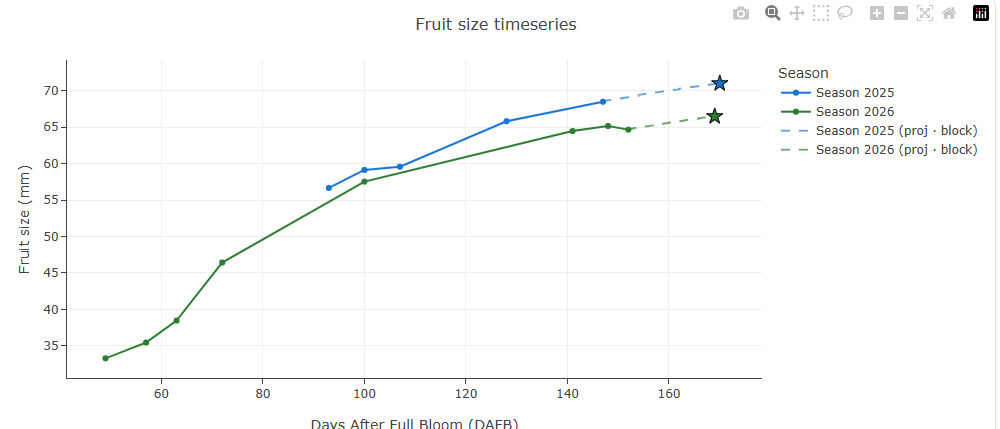
                Block-level growth curve · weekly measurements → predicted final size
              </div>
              <img
                src="assets/portal-fruit-size-graph.png"
                alt="Fruit-size growth curve — weekly measurements with predicted final size"
                data-img-file="assets/portal-fruit-size-graph.png"
                style={{
                  width: '100%',
                  height: 'auto',
                  display: 'block',
                  border: '1px solid var(--line)',
                  borderRadius: 8,
                }} />
            </div>
          </div>
        </div>
      </section>

      {/* Two-device hardware grid =========================== */}
      <section className="section warm">
        <div className="container-wide">
          <div className="section-eyebrow">02 · The hardware</div>
          <h2 className="section-title">Same family. <em>Two ways to measure.</em></h2>
          <p className="section-lede" style={{ marginBottom: 'var(--space-4)', maxWidth: 760 }}>
            Some seasons you need the whole block; others you need 200 spot checks. Both devices speak the same protocol and land in the same place.
          </p>

          <div className="rss-device-grid">
            {devices.map((d, i) => (
              <article key={i} className="rss-device">
                {d.isVideo ? (
                  <div className="rss-device-img" data-img-file={d.img} style={{ position: 'relative', background: '#0F1410' }}>
                    <video
                      src={d.img}
                      autoPlay muted loop playsInline preload="auto"
                      aria-label={d.imgLabel}
                      ref={(el) => {
                        if (!el) return;
                        el.muted = true; el.volume = 0;
                        if (el.__io) { el.__io.disconnect(); el.__io = null; }
                        const io = new IntersectionObserver((entries) => {
                          entries.forEach(en => { if (en.isIntersecting) el.play().catch(() => {}); else el.pause(); });
                        }, { threshold: 0.1 });
                        io.observe(el);
                        el.__io = io;
                      }}
                      style={{ position: 'absolute', inset: 0, width: '100%', height: '100%', objectFit: 'cover', display: 'block' }} />
                  </div>
                ) : (
                  <div className="rss-device-img" data-img-file={d.img + ' (placeholder)'} style={{ backgroundImage: `url('${d.img}')` }} role="img" aria-label={d.imgLabel} />
                )}
                <div className="rss-device-body">
                  <div className="rss-device-tag">{d.tag}</div>
                  <h3 className="rss-device-name">{d.name}</h3>
                  <div className="rss-device-sub">{d.sub}</div>
                  <p className="rss-device-claim">{d.claim}</p>
                  <p className="rss-device-copy">{d.copy}</p>
                  <ul className="rss-device-stats">
                    {d.stats.map((s, j) => (
                      <li key={j}>
                        <strong>{s.k}</strong>
                        <span>{s.l}</span>
                      </li>
                    ))}
                  </ul>
                </div>
              </article>
            ))}
          </div>
        </div>
      </section>

      {/* Drive the row (full-bleed video) =================== */}
      <section className="section">
        <div className="container-wide">
          <div className="section-eyebrow">03 · The drive</div>
          <h2 className="section-title">Drive the row. <em>Watch the block fill in.</em></h2>
          <p className="section-lede" style={{ marginBottom: 'var(--space-4)', maxWidth: 720 }}>
            One pass between the rows is enough. Every tree gets counted, sized, and pinned to GPS as you go — both sides simultaneously.
          </p>
          <div style={{
            background: '#0F1410', border: '1px solid var(--line)',
            borderRadius: 'var(--radius-lg)', padding: 0,
            position: 'relative', overflow: 'hidden', aspectRatio: '21/9',
          }}>
            <video
              src="assets/home-hero-field.mp4"
              autoPlay muted loop playsInline
              poster="assets/revscout-field.png"
              aria-label="RevScout S driving the orchard rows"
              ref={(el) => {
                if (!el) return;
                el.muted = true; el.defaultMuted = true; el.volume = 0;
                if (el.__io) { el.__io.disconnect(); el.__io = null; }
                el.playbackRate = 0.9;
                const io = new IntersectionObserver((entries) => {
                  entries.forEach(en => { if (en.isIntersecting) el.play().catch(() => {}); else el.pause(); });
                }, { threshold: 0.1 });
                io.observe(el);
                el.__io = io;
              }}
              style={{ position: 'absolute', inset: 0, width: '100%', height: '100%', objectFit: 'cover', display: 'block', opacity: 0.92 }} />
            <div style={{ position: 'absolute', inset: 0, background: 'linear-gradient(180deg, rgba(15,20,16,0.15) 0%, rgba(15,20,16,0) 50%, rgba(15,20,16,0.35) 100%)', pointerEvents: 'none' }} />
            <div style={{ position: 'absolute', left: 24, bottom: 20, fontFamily: 'JetBrains Mono, monospace', fontSize: 11, letterSpacing: '0.12em', color: '#B8DC73', background: 'rgba(15,20,16,0.55)', padding: '6px 12px', borderRadius: 4, border: '1px solid rgba(184,220,115,0.25)' }}>
              FROM THE TRACTOR · ATV-MOUNTED CAMERA · 30/100 ha/d
            </div>
          </div>
        </div>
      </section>

      {/* 6-step workflow ==================================== */}
      <section className="section warm">
        <div className="container-wide">
          <div className="section-eyebrow">04 · The workflow inside RevToolbox</div>
          <h2 className="section-title">From row drive to <em>yield prediction</em>, in six steps.</h2>
          <p className="section-lede" style={{ marginBottom: 'var(--space-4)', maxWidth: 760 }}>
            Drive the rows once; the platform runs the rest. Raw field counts → per-tree aggregation → block raster → 5-zone map → calibration to field truth → block yield prediction. Outputs flow back to your packhouse and your spreader.
          </p>
          <ol className="rsf-grid">
            {workflow.map(s => (
              <li key={s.n} className="rsf-card">
                <div className="rsf-img" data-img-file={s.file} style={{ backgroundImage: `url('${s.file}')` }} role="img" aria-label={s.t} />
                <div className="rsf-meta">
                  <span className="rsf-num">{s.n}</span>
                  <span className="rsf-tag">{s.tag}</span>
                </div>
                <h4>{s.t}</h4>
                <p>{s.d}</p>
              </li>
            ))}
          </ol>
        </div>
      </section>

      {/* Calibration ======================================== */}
      <section className="section">
        <div className="container-wide">
          <div className="section-eyebrow">05 · Calibration</div>
          <h2 className="section-title">Calibrate <em>before</em> or <em>after</em> the scan.</h2>
          <p className="section-lede" style={{ marginBottom: 'var(--space-4)', maxWidth: 760 }}>
            Both paths happen inside RevToolbox · Block Inspector · Yield Prediction. The <strong>RevField</strong> mobile app captures the field counts; the portal builds the regression and applies it across the block.
          </p>
          <div className="calib-grid">
            {calibMethods.map((m, i) => (
              <article key={i} className="calib-card">
                <div className="calib-img" data-img-file={m.file} style={{ backgroundImage: `url('${m.file}')` }} role="img" aria-label={m.title} />
                <div className="calib-body">
                  <div className="calib-tag">{m.tag}</div>
                  <h4>{m.title}</h4>
                  <p>{m.copy}</p>
                  <div className="calib-hint">{m.hint}</div>
                </div>
              </article>
            ))}
          </div>
        </div>
      </section>

      {/* Outputs (now relocated above) ===================== */}
      {/* Audiences ========================================== */}
      <section className="section warm">
        <div className="container-wide">
          <div className="section-eyebrow">06 · Who it's for</div>
          <h2 className="section-title">One forecast, <em>four teams aligned.</em></h2>
          <p className="section-lede" style={{ marginBottom: 'var(--space-4)', maxWidth: 720 }}>
            Linking markets and producers means one number drives Monday-morning decisions across the chain.
          </p>
          <div className="grid-4">
            {audience.map((a, i) => (
              <div key={i} style={{
                background: 'var(--paper)', border: '1px solid var(--line)',
                borderRadius: 'var(--radius-lg)', padding: 'var(--space-3)',
                display: 'flex', flexDirection: 'column', gap: 14,
              }}>
                <div style={{ fontFamily: "'Instrument Serif', serif", fontSize: 48, lineHeight: 1, color: 'var(--accent)', fontStyle: 'italic' }}>{a.n}</div>
                <div>
                  <h3 style={{ fontFamily: 'var(--font-display)', fontSize: 22, margin: 0, fontWeight: 600, letterSpacing: '-0.01em' }}>{a.t}</h3>
                  <p style={{ color: 'var(--muted)', fontSize: 14, lineHeight: 1.5, margin: '8px 0 0' }}>{a.d}</p>
                </div>
              </div>
            ))}
          </div>
        </div>
      </section>

      {/* Getting started =================================== */}
      <section className="section">
        <div className="container-wide">
          <div className="section-eyebrow">07 · How to start</div>
          <h2 className="section-title">From first measurement to <em>weekly forecast</em>, in three.</h2>
          <div style={{ display: 'flex', flexDirection: 'column', gap: 12, marginTop: 'var(--space-3)' }}>
            {[
              { n: '01', tag: 'WEEK 0',      t: 'Pick a device — or both',         d: 'Order Rev-Sizers for spot-checking, book a RevScout S survey for whole-block coverage, or do both. Calibrated, shipped from Stellenbosch.' },
              { n: '02', tag: 'WEEKS 1–14',  t: 'Measure on your cycle',            d: 'Weekly Rev-Sizer readings, or one camera pass per phenological window. Wi-Fi sync at the office or on the bakkie. Day zero is full bloom.' },
              { n: '03', tag: 'CONTINUOUS',  t: 'Read the forecast in RevToolbox',  d: 'Growth curves and predicted distributions update live. PDF reports go to packhouse and marketing. Prescription files export to your spreader.' },
            ].map((s, i) => (
              <div key={i} className="rs-step-card" style={{
                padding: 'var(--space-3)', background: 'var(--paper)',
                border: '1px solid var(--line)', borderRadius: 'var(--radius-lg)',
              }}>
                <div className="rs-step-num" style={{ fontFamily: "'Instrument Serif', serif", fontSize: 48, fontStyle: 'italic', color: 'var(--accent)', lineHeight: 1 }}>{s.n}</div>
                <div className="rs-step-tag"><span className="tag">{s.tag}</span></div>
                <div className="rs-step-content">
                  <h3 style={{ fontFamily: 'var(--font-display)', fontSize: 22, margin: '0 0 6px', fontWeight: 600, letterSpacing: '-0.01em' }}>{s.t}</h3>
                  <p style={{ color: 'var(--muted)', fontSize: 14.5, lineHeight: 1.55, margin: 0, maxWidth: 760 }}>{s.d}</p>
                </div>
              </div>
            ))}
          </div>
        </div>
      </section>

      {/* CTA ================================================ */}
      <section className="cta-banner">
        <div className="container-wide" style={{ display: 'flex', justifyContent: 'space-between', alignItems: 'center', flexWrap: 'wrap', gap: 'var(--space-3)' }}>
          <div>
            <h2 style={{ marginBottom: 0 }}>Bring fruit size <em style={{ fontFamily: "'Instrument Serif', serif", color: '#B8DC73', fontStyle: 'italic', fontWeight: 400 }}>into focus.</em></h2>
            <p style={{ marginTop: 12 }}>Hardware, RevToolbox V4 trial, agronomy walk-through — let's talk through what fits your farm.</p>
          </div>
          <div style={{ display: 'flex', gap: 10 }}>
            <a className="btn btn-primary btn-lg" href="#" onClick={e => { e.preventDefault(); setRoute('contact'); }}>Get in touch →</a>
            <a className="btn btn-light btn-lg" href="#" onClick={e => { e.preventDefault(); setRoute('pricing'); }}>See pricing</a>
          </div>
        </div>
      </section>
    </>
  );
};

Object.assign(window, { RevScoutSPage: window.RevScoutSPage });
